What is the EKLG font, and why Gujarati designers need a Unicode converter
Illustration generated with AI
You type a Gujarati line in WhatsApp, paste it into your design software and see boxes, question marks or the wrong shapes. Or the opposite: you open an old design file, copy its text and get a wall of random English characters. Both problems come from the same place, the way the letters are stored.
What is Unicode?
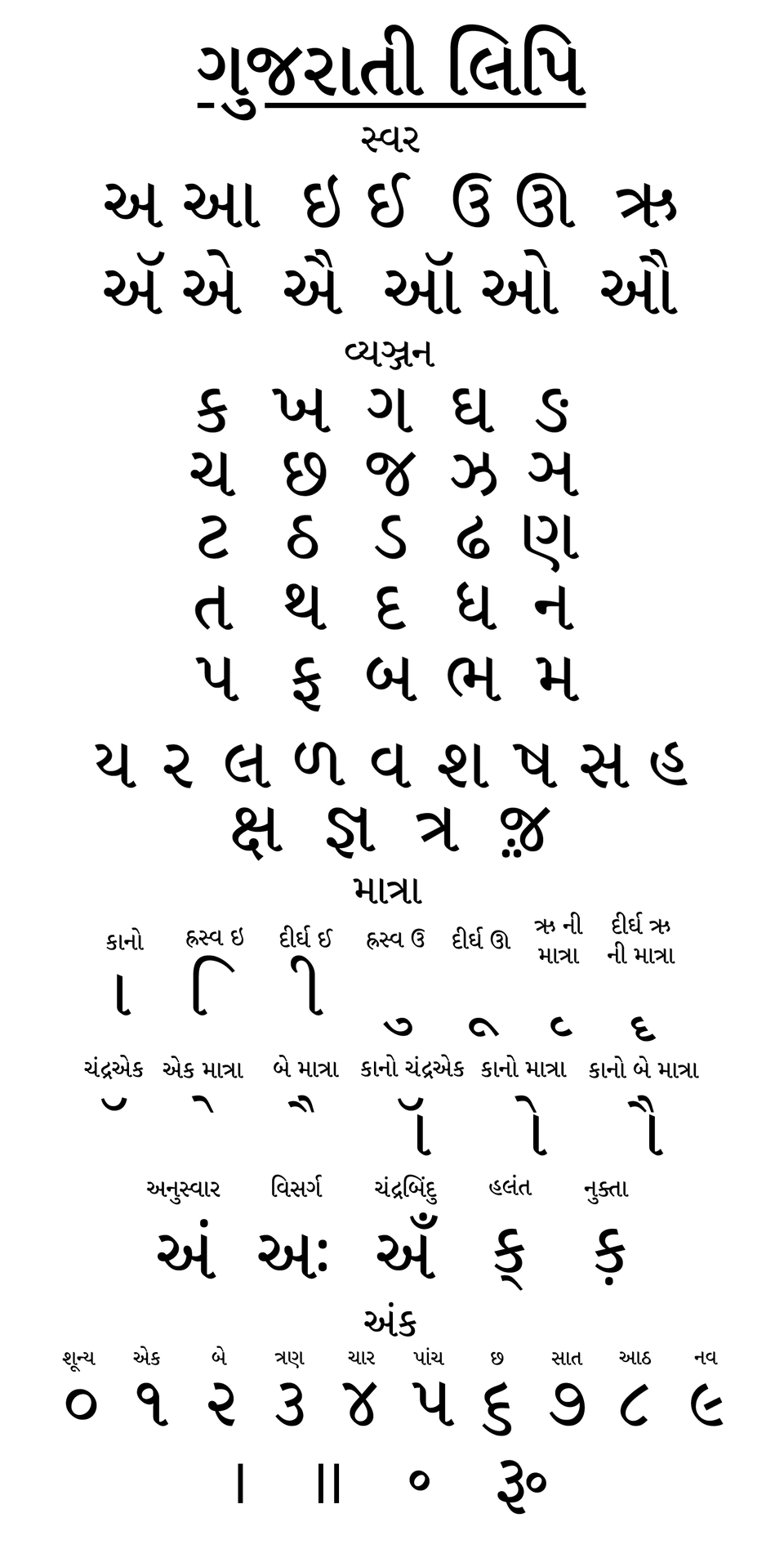
Unicode is the common system modern phones, websites and apps use to store text from every language. Each Gujarati letter has a fixed code, and any app with a Gujarati font can display it. When you type Gujarati on your phone or on most websites, you are using Unicode.
It works well for reading and sharing. The complications arrive with design and printing.
What is a legacy font like EKLG-17?
Before Unicode was common, Gujarati design software used fonts that reused English keyboard keys. Press the key for "k" and the font draws a Gujarati letter. The file only stores English characters, and the font is what makes them look Gujarati. EKLG-17 is one such font used in DTP and print workflows.
That explains the odd behaviour. If you paste EKLG text into an app without that font, it looks like English gibberish, because the file really does contain English letters.
Why does this matter for print work?
Many designers and print shops still use software, templates and habits built around legacy fonts. Their old files, their favourite fonts and sometimes their printer's workflow depend on them. Meanwhile, customers send names and wording through WhatsApp, which is Unicode. Someone has to bridge the two.
Retyping the whole text by hand in the legacy format is slow and error-prone, especially for long wording or many names.
A worked example with one invitation line
Suppose a customer sends a message in Gujarati on WhatsApp with the family names, the date and the venue. That is Unicode. Your layout uses an EKLG-17 font.
- Copy the text from WhatsApp.
- Open the converter and use the Unicode to EKLG-17 tab.
- Paste the text and copy the converted output.
- Paste it into your design software and set the font to EKLG-17.
- The Gujarati shapes appear. Proofread against the original message.
Going the other way, if you need an old design's text for a website or a message, copy it, use the EKLG-17 to Unicode tab, and you get normal text.
Why does the converted text look wrong in a normal text box?
Because the converted text is English characters meant to be drawn with the EKLG font. In a plain app with the default font, you will see odd letters. That does not mean the conversion failed. Only a text field set to the EKLG font will draw the right shapes. If it still looks wrong with the font selected, check that the font is installed on that computer.
What are the limits of any converter?
Conversion between two encodings is rule-based, and some combinations are tricky: conjuncts, half letters, special marks and vowel signs that are ordered differently in the two systems. A converter can handle most text and still mishandle a few rare cases. For printed work:
- Convert, paste and read the output against the original.
- Pay particular attention to joined letters and to names.
- Keep a copy of the original Unicode text so you can compare.
- Fix mistakes by hand in the design software.
We would rather say this clearly than promise a perfect result.
Should you move to Unicode fonts altogether?
If your tools and your printer support it, working in Unicode with a good Gujarati font makes life simpler: copying from chats just works, searching works, and files stay readable. The reason to stay with legacy fonts is compatibility with existing templates and habits. Many shops will use both for a long time. A converter lets you work in the world that fits each task.
How do you set up a clean workflow?
Decide where each type of text lives. Keep customer messages and anything for the web or chats in Unicode. Convert to EKLG-17 only at the moment you place text in your layout software, and never convert back and forth repeatedly, because each pass adds a chance of error. Store the original Unicode text next to each design file in a text document. If you need to change something later, edit the Unicode and convert again, instead of patching the converted text. Back up your fonts with your design files, so a new computer does not break old jobs.
A note on fonts and licences
Fonts are software, and many have licences that limit where you can install or share them. If you work with a printer or a freelancer, check that each person has a legitimate copy of the font. Do not send font files around casually. When in doubt, send a PDF with the fonts embedded, so the other side sees the exact result without needing the font. This keeps you out of trouble and avoids the common problem of a file that looks right on your machine and wrong on theirs.
What to do next
Take one real line from a past job, convert it in both directions and compare it with the original. That tells you how well the tool handles your style of text. Keep the EKLG font installed on the machine you use for layout, and note which software you use it in.
FAQs
Is EKLG-17 a Unicode font? No, it is a legacy font where English keys map to Gujarati shapes. That is why it needs conversion when you move text between it and normal apps.
Can I paste converted text into WhatsApp? Not if you want Gujarati to show. Use Unicode text for chats and websites, and EKLG text only inside design software with the font set.
Why do names convert wrongly sometimes? Names often use unusual letter combinations. Check them manually after conversion and correct the details in your layout.
Image credits: Illustration generated with AI for Infigrow AI, Photo: Gujarati Varnamala by Symphonicallyu (CC0), via Wikimedia Commons, Photo: Playlist Script typeface sample by Cyrus noto3at bulaga (CC BY-SA 4.0), via Wikimedia Commons